
Workflows
Gaps in medical device development documents are hard to find. Create code-backed requirements, design, and SOUP drafts plus a gap report. Owners and experts review omissions and unconfirmed items.
For medical device software documentation, separate facts available in code from decisions that need an owner, then prepare drafts and a gap list.
When this is your problem
Implementation progresses, but requirements, design, and third-party software records still need repeated code-to-document comparisons. Broken references and missing product or safety information make it hard to know what to complete first.
Solve it with Specify
- Connect the GitHub repository and required document skills, and provide product facts not found in code.
- Generate requirements, architecture, and SOUP drafts in Specify, then check code evidence and references between documents.
- Use the gap report to collect omissions and unconfirmed items for owners. Experts review regulatory and safety judgments before submission.
What can you produce?
| Your task | Documents | Output to review |
|---|---|---|
| Document implemented behavior and structure | Requirements specification · Architecture design | Drafts with requirement IDs, architecture items, and supporting file paths |
| Organize external software components | SOUP list | Component identities, evidence for versions and usage, and open review items |
| Find gaps in the document set | Document set gap report | A report of missing sections, unconfirmed information, [GAP] items, and broken ID references |
Read these markers first
| Marker | Meaning |
|---|---|
| REQ-… / ARCH-… | IDs for requirements and architecture items. Check that references point to real items and that their content agrees. |
| [unconfirmed] | A proposed value that an owner has not confirmed. Do not use it as an approved fact. |
| [GAP] | Missing evidence or input that needs review. The marker does not determine regulatory compliance by itself. |
| SOUP | A marker for software whose source or development history is not fully known. Finding its version and usage does not complete a safety impact review. |
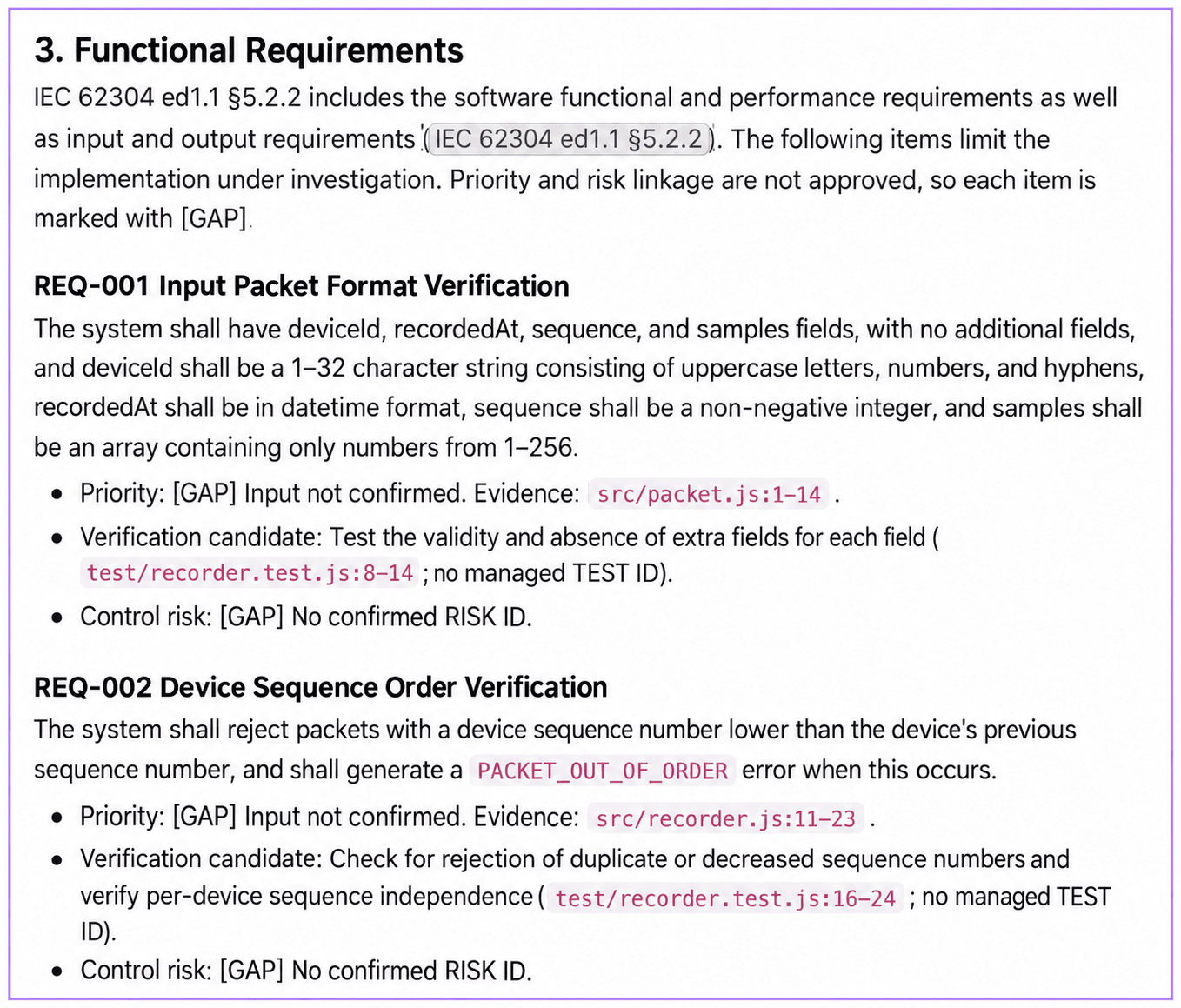
The project used in this example
MedRelay Demo is a small documentation example implementing synthetic device packet validation, sequence checks, in-memory retention, and CSV export. The screens show actual app execution connected to this code. No real patient data or customer project is used.
Download the example code, place it in your own GitHub repository, and follow the same workflow. This is not an actual medical device or a certification success story. Safety classification and risk acceptance criteria are intentionally left unconfirmed.
Generated documents are drafts that require regulatory and quality expert review before submission. Implementation facts recovered from code do not replace approved requirements or evidence of performed tests. The responsible people must confirm the target market, intended use, safety classification, and applicable standards and editions.
Before you start
- Connect the GitHub repository and branch you want to document. Begin with a repository whose review scope is clear.
- Confirm editing permissions and a plan that supports document projects. See pricing for current availability.
- Prepare information that code alone cannot confirm: product purpose, users, use environment, and code scope.
- Check access to the standards library. If standards search is unavailable or a clause cannot be found, leave the evidence gap visible for review.
In Settings → AI Agent → Plugins, find medical-device-docs, inspect its skills, and install it. The pack includes 10 skills covering profile intake, document drafting, and gap review.
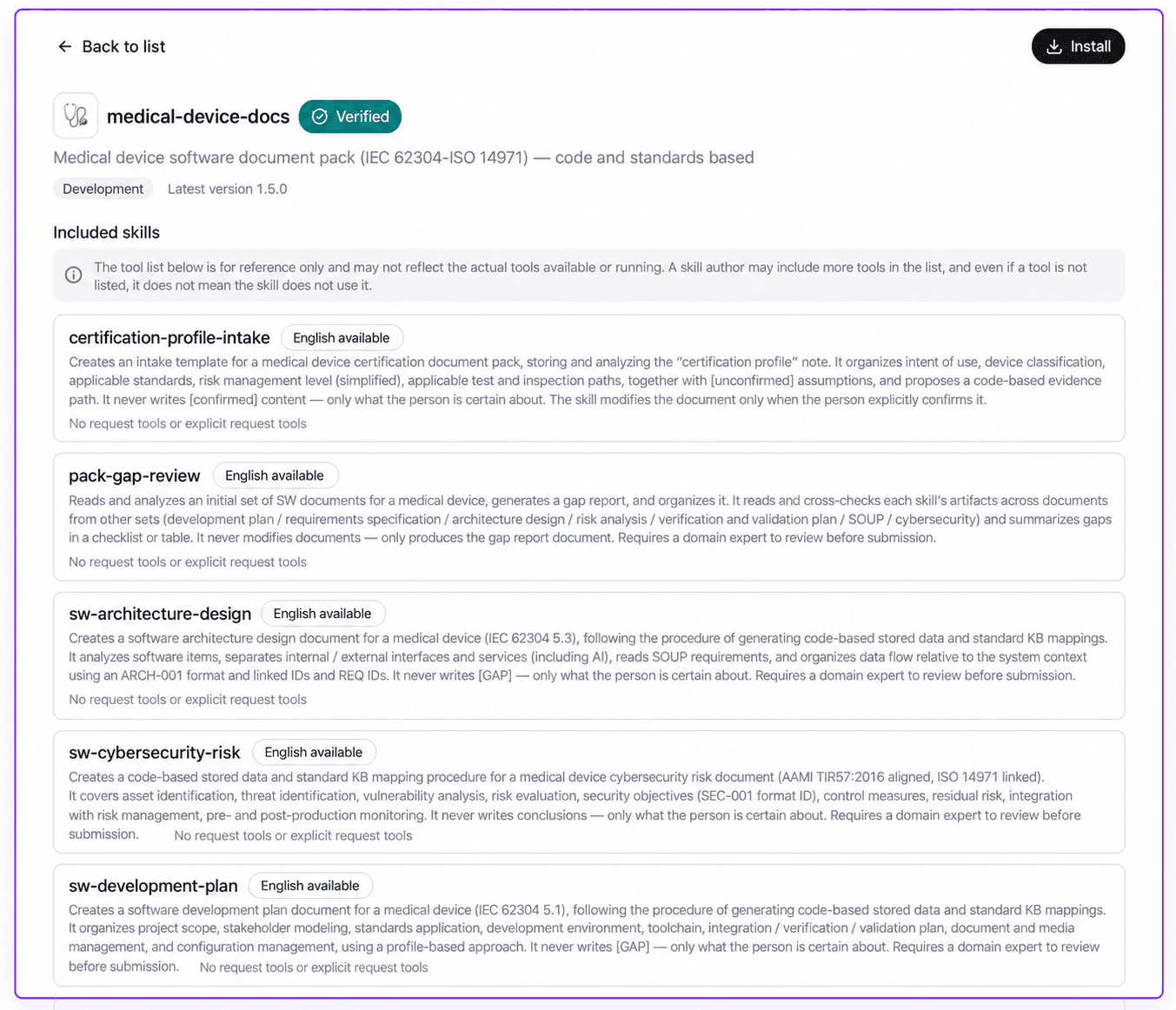
Example 1. Draft requirements and architecture documents
Review the product information first
First, use Create project to select the repository and branch, choose Certification profile intake, and generate it. certification-profile-intake reads the repository and proposes values for a certification profile. Product identity, intended use, and system boundaries include code evidence or an explanation of what could not be established.
[unconfirmed] means a person has not confirmed the value. Change only reviewed fields to [confirmed]. Leave safety classification and risk acceptance criteria unconfirmed until the responsible people decide them. Subsequent documents treat only confirmed profile values as facts.
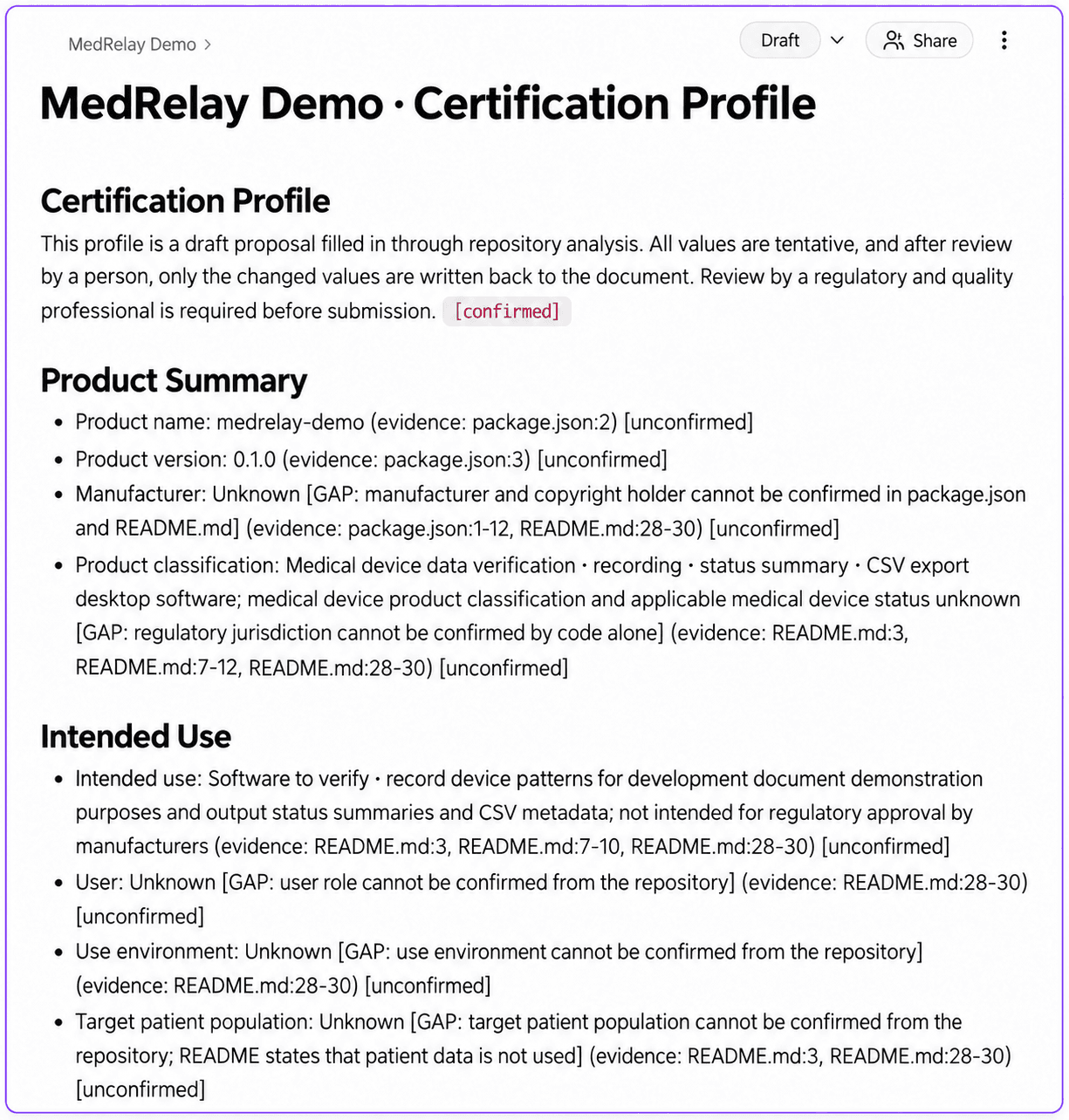
Choose the documents and scope
Add documents to the same project
Use the project's add-document button in the sidebar. The existing repository and branch are reused. If an earlier progress panel opens, select Close to return to document selection.
Select requirements and architecture
In Documents, clear the previous selection and select Software requirements specification (IEC 62304) and Software architecture design (IEC 62304). This example also selects SOUP list (IEC 62304) for Example 2. Use View execution details to inspect the scope.
Connect the reviewed certification profile
Expand each document in Selected document settings and provide the same Certification profile node ID. Open the profile document: the final
node-…part of its address is the node ID. Without a connected profile or confirmed values, related information remains unconfirmed instead of being invented.Review the selection and generate
Check the document selection and inputs, then select Create 3 document types. Requirements and SOUP start first; architecture starts after the requirements run in the same batch finishes. Open the documents to inspect the output.
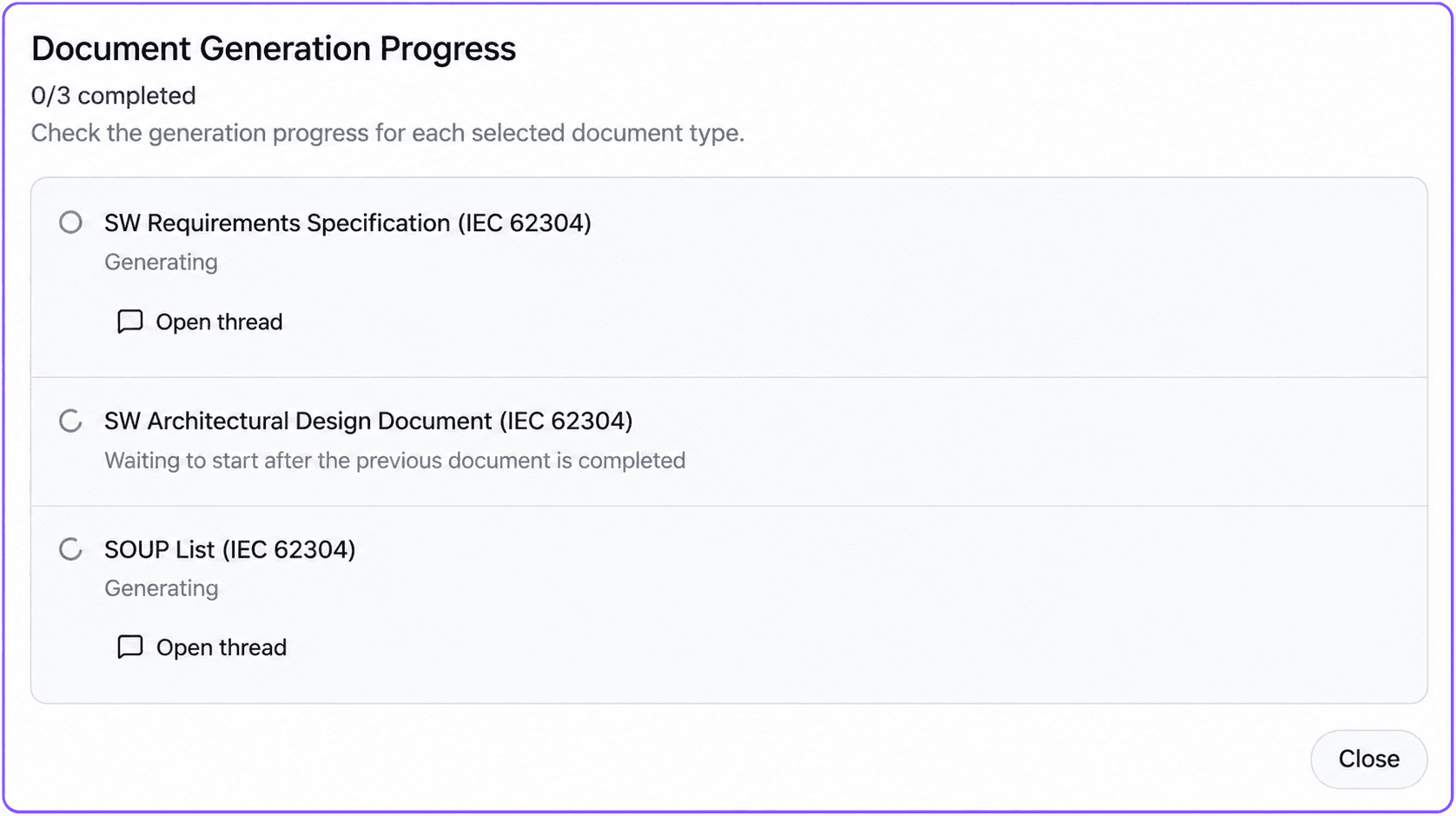
What to check in the output
Follow IDs such as REQ-001 in the requirements document and ARCH-001 in the architecture document to check the descriptions against the implementation. Supporting file paths are the starting point for checking the evidence again.
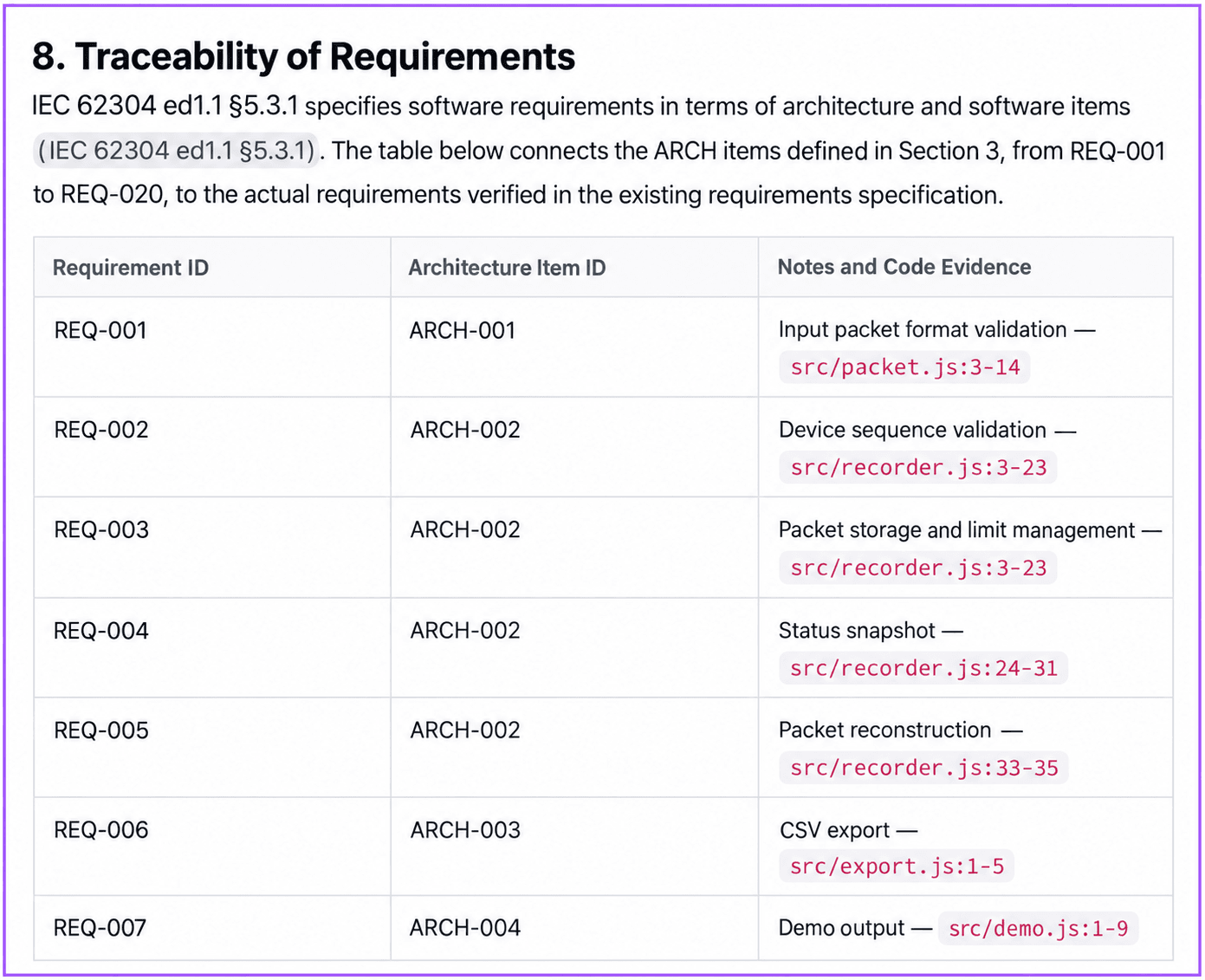
| Review item | Human review task |
|---|---|
| Behavior and interfaces | Compare with code; record missing requirements or differences between requirements and implementation |
| Requirements-to-design links | Confirm referenced IDs exist and the linked content matches |
| Standards citations | Confirm the standard, edition, and clause fit the review scope |
[GAP] and unconfirmed values | Assign the product, development, regulatory, or quality owner who can resolve them |
| Verification information | Separate plans from performed activities and check test records as independent evidence |
Example 2. Prepare SOUP review information
Use sw-soup-list, the SOUP list skill, to organize external libraries and software components. It drafts identification information from dependency manifests and lock files in the repository.
Compare names, exact versions, licenses, and usage locations with the original files. If a license or an evaluation of known anomalies cannot be verified, keep that absence explicit.
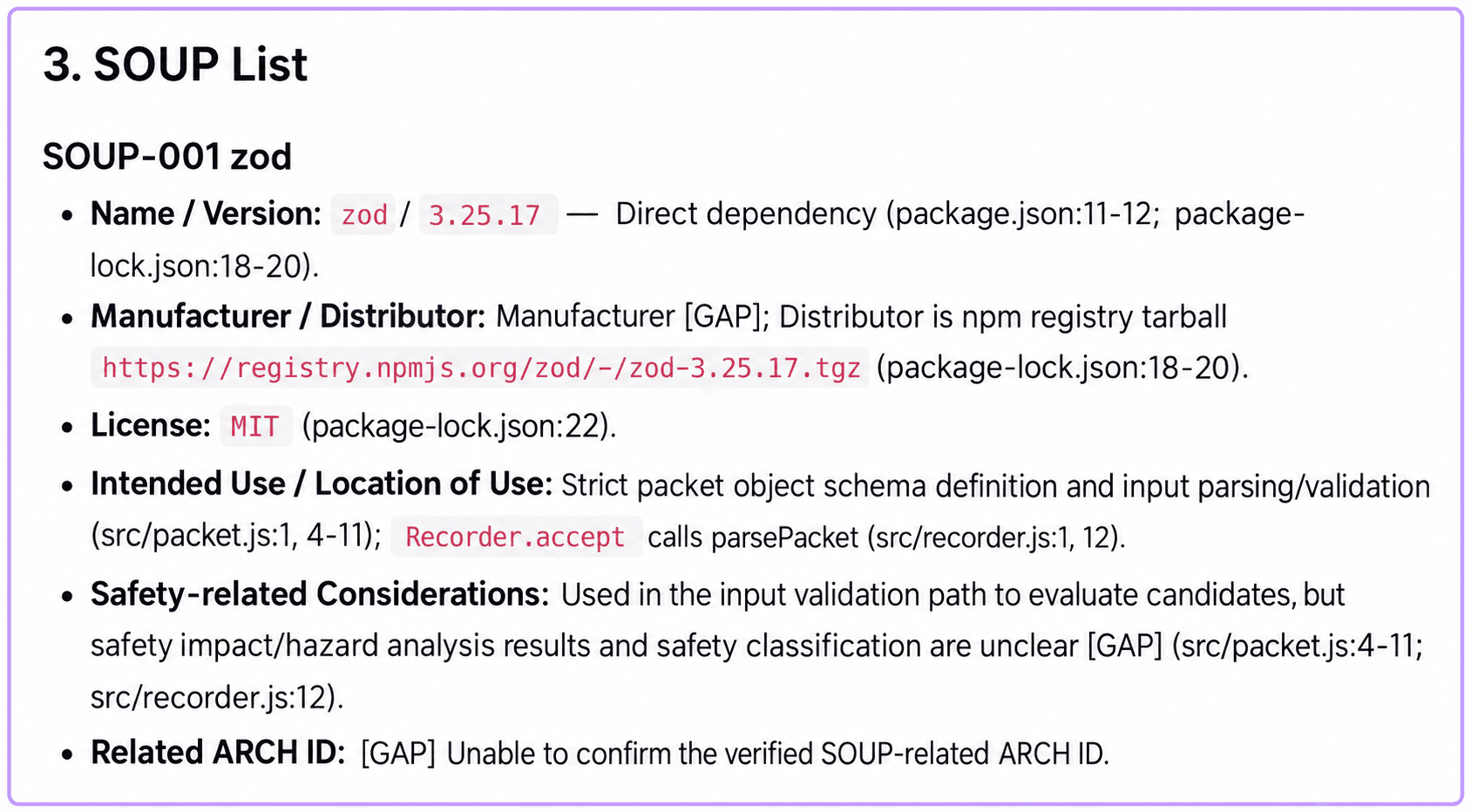
A dependency inventory alone does not complete SOUP review. People must review coverage of direct and transitive dependencies, whether each component qualifies as SOUP, known anomaly evaluations, and product safety impact. Do not record vulnerability checks or risk assessments as completed when they have not been performed.
Example 3. Find gaps in your document set
Once all documents have finished, open add-document in the same project. Clear the previous selection, select only Software document set gap report, supply the same certification profile node ID, and select Create 1 document types. The pack-gap-review skill reads the other documents and writes a report without modifying the documents being reviewed.
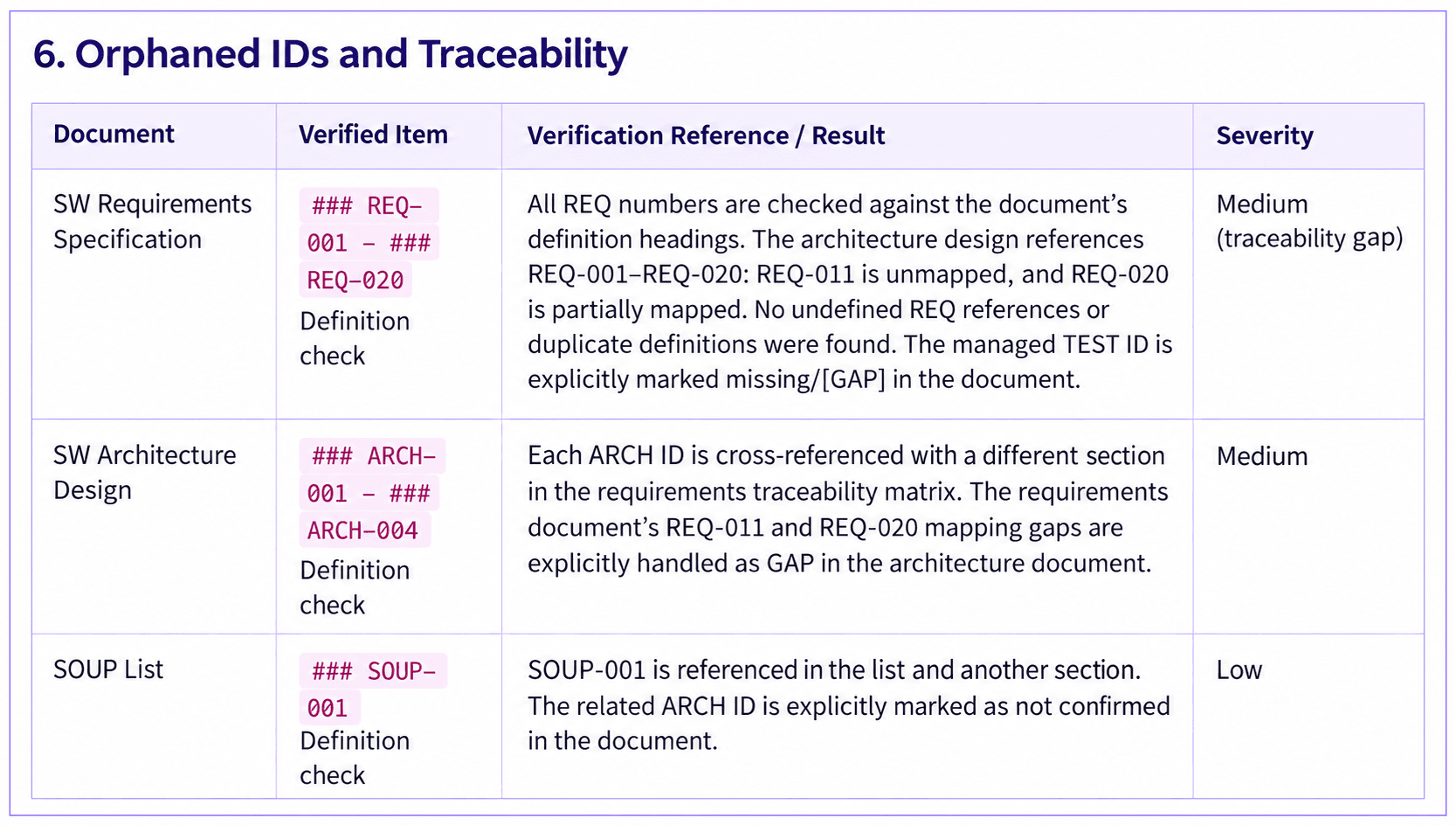
This run flagged unmapped REQ-011, partially mapped REQ-020, and the SOUP item's ARCH link for review. It read the requirements, architecture, SOUP, and certification profile documents. Other documents not found through title discovery were recorded as unassessed, rather than being declared nonexistent.
| Report finding | Next action |
|---|---|
| Missing required section or empty content | Complete the relevant section and supply evidence |
| Missing standards reference | Check applicability and search results; supply a citation or explain the evidence gap |
| Broken requirement or architecture ID | Link the actual item or check its retirement record |
| Unconfirmed information presented as fact | Compare with the profile, correct it, and request owner review |
Remaining [GAP] items | Obtain the required input, evidence, or decision and review again |
Use this report as a list of work to complete against the document pack's checklist. Finding no missing items does not establish full regulatory compliance or submission readiness.
After the code changes
The pack's eight development document types and gap report use whole-document rewriting. With Automatically update on repository changes enabled, changes on the selected branch trigger updates to existing managed documents. Unlike incremental updates to affected sections, this rewrites the document as a whole, so review the output alongside human additions. Automatic updates were disabled for this example's initial generation.
Before and after regeneration, check that confirmed product information, existing item IDs, human-supplied evidence, and review records remain consistent. Profile intake uses a separate incremental mode; it preserves confirmed values and records items that need reconsideration.
Start with your project
Begin with one repository → profile review → requirements and architecture drafts → gap review. Use the first review to identify missing inputs and responsible people, then extend to SOUP, risk management, and usability documents.